Secure Your System: The Ultimate Computer Virus Prevention ChecklistComputer Virus Prevention
Introduction
In today’s digital world, computers are part of everyday life. People use laptops, desktops, tablets, and smartphones for work, education, communication, shopping, banking, and entertainment. As technology continues to grow, cyber threats are also becoming more advanced. One of the most common threats is a computer virus. A virus can damage files, slow down systems, steal personal information, and even lock users out of their devices.
Computer virus prevention is no longer only for large businesses or IT experts. Every internet user should understand how viruses spread and how to stay protected. A small mistake such as clicking an unsafe link or downloading a suspicious file can infect an entire system within seconds.
This guide explains computer virus prevention in simple language. It covers different virus types, warning signs, protection methods, security tools, safe browsing habits, and practical tips that anyone can follow.
What Is a Computer Virus
A computer virus is a malicious program designed to spread from one device to another. It usually enters a computer without permission and performs harmful activities. Some viruses destroy files, while others steal passwords, track online activity, or corrupt software.
Viruses often attach themselves to legitimate files or programs. Once activated, they begin spreading throughout the computer system.
Main Characteristics of a Computer Virus
- Self-replicating behavior
- Ability to infect files or programs
- Hidden malicious activity
- Potential to damage systems
- Capability to spread through networks or devices
Types of Computer Viruses
Understanding different virus types helps users recognize risks more effectively.
| Virus Type | Description |
| File Infector Virus | Attaches itself to executable files |
| Boot Sector Virus | Infects the startup section of a computer |
| Macro Virus | Targets documents and spreadsheets |
| Ransomware | Locks files and demands payment |
| Spyware | Secretly monitors user activity |
| Trojan Horse | Disguises itself as useful software |
| Worm | Spreads automatically across networks |
| Adware | Displays unwanted advertisements |
Why Computer Virus Prevention Is Important
Ignoring cybersecurity can lead to serious consequences. A virus infection may affect personal users, businesses, schools, and government organizations.
Risks of Virus Attacks
- Loss of important files
- Identity theft
- Banking fraud
- Slow computer performance
- Data corruption
- Privacy invasion
- Financial loss
- Business downtime
Prevention is always easier and cheaper than recovery. Once data is stolen or deleted, restoring it can be difficult.
Common Ways Viruses Spread
Viruses spread through many digital channels. Cybercriminals often trick users into downloading infected files or visiting unsafe websites.
Common Infection Sources
- Email attachments
- Fake software downloads
- Pirated applications
- Unsafe websites
- USB drives
- Social media links
- Fake advertisements
- Infected mobile apps
Example Scenario
A user receives an email claiming they won a prize. The email contains an attachment labeled “Winner Details.” After opening the file, malware installs itself silently in the background.
This is one of the most common cyberattack methods.
Signs Your Computer May Have a Virus
Detecting a virus early can reduce damage. Many infected computers show unusual behavior.
Warning Signs
- Slow startup speed
- Frequent crashes
- Pop-up advertisements
- Programs opening automatically
- Unknown files appearing
- Browser redirects
- Internet activity spikes
- Disabled antivirus software
Serious Symptoms
- Missing files
- Locked documents
- Password changes
- Unauthorized banking activity
- System overheating
If users notice multiple symptoms together, a malware scan should be performed immediately.
Best Computer Virus Prevention Methods
Strong prevention habits significantly reduce infection risks.
Install Reliable Antivirus Software
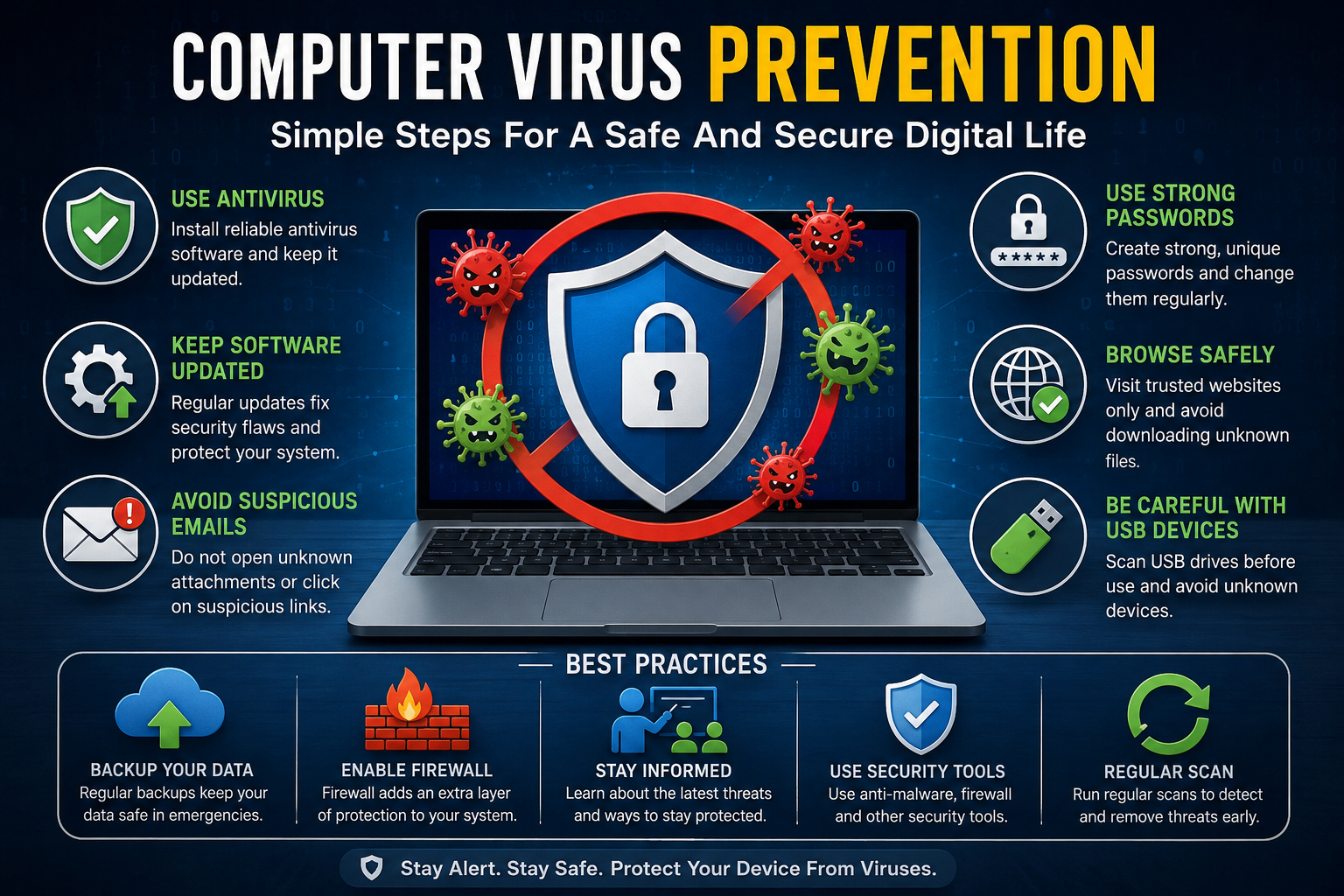
Antivirus software is one of the most important security tools. It detects, blocks, and removes malicious files before they harm the system.
Features of Good Antivirus Programs
- Real-time protection
- Automatic updates
- Malware scanning
- Email protection
- Web filtering
- Ransomware defense
Benefits of Antivirus Protection
- Continuous monitoring
- Fast threat detection
- Safer browsing experience
- Reduced infection risk
Users should avoid installing multiple antivirus programs because they may conflict with each other.
Keep Software Updated
Outdated software often contains security vulnerabilities. Hackers exploit these weaknesses to infect devices.
Important Updates
- Operating system updates
- Browser updates
- Security patches
- Application updates
- Driver updates
Why Updates Matter
Software companies regularly fix security flaws. Delaying updates gives cybercriminals more opportunities to attack.
Automatic updates are recommended whenever possible.
Use Strong Passwords
Weak passwords increase hacking risks. Password security is a key part of computer virus prevention.
Tips for Strong Passwords
- Use at least 12 characters
- Combine numbers and symbols
- Avoid personal information
- Use different passwords for every account
- Change passwords regularly
Example of Strong Password Structure
- Weak Password: password123
- Strong Password: T9#pL2@vQ7!m
Password managers can help store secure passwords safely.
Avoid Suspicious Emails
Phishing emails are designed to steal information or spread malware.
Red Flags in Emails
- Unknown sender
- Urgent messages
- Grammar mistakes
- Suspicious attachments
- Fake company logos
- Requests for passwords
Safe Email Practices
- Never click unknown links
- Verify sender identity
- Scan attachments before opening
- Delete suspicious messages
Cybercriminals often pretend to be banks, delivery companies, or social media platforms.
Practice Safe Internet Browsing
Unsafe websites are major malware sources.
Safe Browsing Habits
- Visit trusted websites only
- Avoid pirated content
- Check website security
- Do not click random ads
- Use browser protection features
HTTPS Security
Websites using HTTPS provide encrypted communication. While HTTPS does not guarantee total safety, it improves protection.
Use a Firewall
A firewall acts as a security barrier between a computer and the internet.
Firewall Functions
- Blocks unauthorized access
- Monitors incoming traffic
- Prevents suspicious connections
- Reduces hacker attacks
Both hardware and software firewalls improve overall cybersecurity.
Backup Important Data
Backups protect files from permanent loss.
Best Backup Methods
- External hard drives
- Cloud storage
- Automatic backups
- Offline storage systems
Backup Benefits
- Faster recovery after attacks
- Protection against ransomware
- Reduced stress during system failure
Experts recommend following the 3-2-1 backup rule:
- 3 copies of data
- 2 different storage methods
- 1 offline backup
Be Careful With USB Devices
USB drives can carry hidden malware.
USB Safety Tips
- Scan devices before use
- Avoid unknown USB drives
- Disable auto-run features
- Use trusted storage devices only
Public USB charging stations can also pose security risks.
Secure Your Wi-Fi Network
Weak Wi-Fi security allows cybercriminals to access connected devices.
Wi-Fi Protection Tips
- Use strong Wi-Fi passwords
- Enable WPA3 encryption
- Change default router credentials
- Disable remote access
- Update router firmware
Home network security is essential because smart devices are connected constantly.
Importance of Cybersecurity Awareness
Technology alone cannot stop every attack. Human awareness plays a major role in virus prevention.
Benefits of Cybersecurity Education
- Better decision-making
- Safer online habits
- Faster threat recognition
- Reduced scam risks
Businesses often provide cybersecurity training because employee mistakes are a leading cause of infections.
Mobile Device Virus Prevention
Smartphones can also become infected.
Mobile Security Tips
- Download apps from official stores
- Avoid unofficial APK files
- Review app permissions
- Update mobile software
- Use mobile security apps
Common Mobile Threats
- Fake banking apps
- Spyware apps
- SMS phishing
- Adware infections
Mobile security is just as important as desktop security.
Cloud Security and Virus Prevention
Many people store files online using cloud services.
Cloud Security Best Practices
- Enable two-factor authentication
- Use strong passwords
- Monitor account activity
- Avoid public Wi-Fi for sensitive access
Cloud storage providers offer additional protection, but users must still follow safe practices.
The Role of Artificial Intelligence in Cybersecurity
Artificial intelligence is improving modern cybersecurity systems.
AI Security Advantages
- Faster threat detection
- Behavioral analysis
- Automated responses
- Improved malware identification
AI-powered tools can identify suspicious behavior before a virus spreads widely.
Common Mistakes That Increase Virus Risks
Many users unknowingly expose themselves to cyber threats.
Dangerous Habits
- Using pirated software
- Ignoring updates
- Clicking random ads
- Sharing passwords
- Disabling antivirus protection
- Downloading unknown files
Avoiding these mistakes greatly improves security.
Computer Virus Prevention for Businesses
Businesses face larger cybersecurity risks because they store valuable customer data.
Business Security Measures
- Employee training
- Endpoint protection
- Data encryption
- Regular security audits
- Secure access controls
Why Businesses Are Targeted
- Financial information
- Customer databases
- Company secrets
- Payment systems
Even small businesses are frequently attacked.
Importance of Multi-Factor Authentication
Multi-factor authentication adds an extra security layer.
Examples of Authentication Factors
- Password
- Mobile verification code
- Fingerprint scan
- Face recognition
Even if hackers steal passwords, additional verification improves protection.
How to Remove a Virus From a Computer
Sometimes prevention fails. Knowing how to respond quickly is important.
Basic Virus Removal Steps
- Disconnect from the internet
- Run antivirus software
- Enter safe mode if necessary
- Delete suspicious files
- Restore backups if needed
- Change passwords
Professional technical support may be required for severe infections.
Future of Computer Virus Prevention
Cybersecurity threats continue evolving every year.
Future Trends
- AI-driven malware
- Advanced ransomware
- Smart device attacks
- Biometric security
- Cloud-focused protection
As technology changes, security strategies must also improve.
Best Daily Habits for Staying Safe Online
Simple daily habits provide long-term protection.
Daily Cybersecurity Checklist
- Update devices regularly
- Scan downloads before opening
- Use secure passwords
- Avoid suspicious websites
- Backup important files
- Monitor account activity
Consistency is the key to strong cybersecurity.
Computer Virus Prevention Tips for Students
Students spend significant time online for learning and entertainment.
Student Safety Tips
- Avoid cheating websites
- Do not download cracked software
- Use educational platforms safely
- Protect school accounts
Educational institutions are common cyberattack targets.
Role of Internet Browsers in Security
Modern browsers include security features.
Browser Security Features
- Pop-up blocking
- Safe browsing warnings
- Tracking protection
- Secure password storage
Keeping browsers updated improves online safety.
Importance of Digital Responsibility
Every internet user shares responsibility for cybersecurity.
Responsible Online Behavior
- Respect privacy
- Verify information
- Avoid illegal downloads
- Report suspicious activity
Safe digital behavior protects individuals and communities.
Conclusion
Computer virus prevention is an essential part of modern digital life. Viruses can damage systems, steal information, and create financial losses. However, most cyber threats can be avoided through smart online habits and proper security measures.
Using antivirus software, updating systems, avoiding suspicious links, securing passwords, and backing up files are some of the best ways to stay protected. Cybersecurity awareness is equally important because many attacks target human mistakes rather than technical weaknesses.
As cyber threats continue evolving, users must remain informed and proactive. Strong digital habits today can prevent major problems tomorrow. Whether someone is a student, employee, business owner, or casual internet user, computer virus prevention should always be a top priority.
FAQs
What is the best way to prevent computer viruses
The best way to prevent computer viruses is to combine multiple security practices. Users should install reliable antivirus software, keep systems updated, avoid suspicious downloads, and use strong passwords. Safe browsing habits also play an important role in reducing malware risks.
Can a computer virus steal personal information
Yes, many viruses are designed to steal personal information such as passwords, banking details, emails, and private documents. Spyware and keyloggers are especially dangerous because they secretly monitor user activity without permission.
How often should antivirus software be updated
Antivirus software should update automatically whenever possible. Daily updates are recommended because new malware threats appear constantly. Updated virus definitions help security programs recognize the latest threats more effectively.
Are free antivirus programs safe to use
Some free antivirus programs provide good basic protection. However, premium security software often includes advanced features such as ransomware defense, firewall protection, and identity monitoring. Users should download antivirus software only from trusted providers.
Can smartphones get computer viruses
Yes, smartphones can become infected with malware, spyware, and harmful applications. Downloading apps from unofficial sources and clicking suspicious links increase mobile security risks. Keeping mobile devices updated improves protection.
What should I do if my computer gets infected
If a computer becomes infected, disconnect it from the internet immediately and run a full antivirus scan. Delete suspicious files, change passwords, and restore backups if necessary. Severe infections may require professional technical assistance.
Why are software updates important for virus prevention
Software updates fix security vulnerabilities that hackers often exploit. Outdated systems are easier to attack because they may contain known weaknesses. Regular updates improve system stability, performance, and overall cybersecurity protection.